

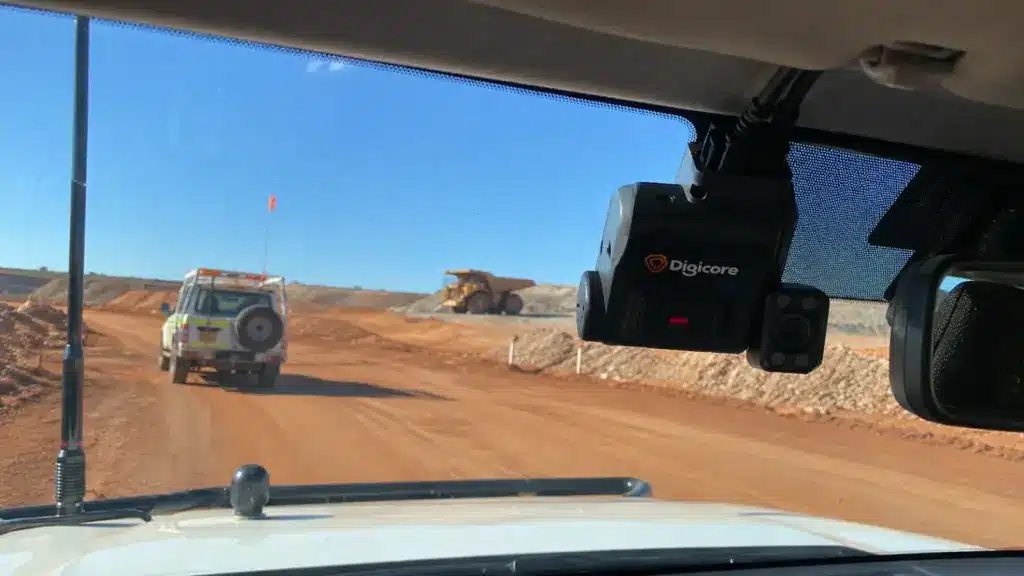
Fleet vehicle tracking uses GPS-enabled devices and software to show where work vehicles are, where they have travelled and when they stop. For commercial fleets, that information makes it easier to assign jobs, review routes, protect vehicles and keep track of daily operations without constantly ringing drivers.
A basic GPS tracker mainly records location and movement. More advanced systems can also capture vehicle and driver information, but those extra features depend on the hardware, vehicle connections and software. Understanding that difference helps you choose the right setup without paying for features your fleet does not need.
Quick Summary
- Fleet GPS tracking records vehicle location and movement, allowing managers to view trips, stops and routes through tracking software.
- A complete tracking system needs a positioning device, a way to send data and a platform that displays useful information.
- Vehicle tracking and fleet management can support dispatching, trip records, vehicle utilisation and more informed scheduling.
- Telematics and IVMS may add engine data, driver behaviour and site safety functions, depending on their configuration.
- Remote coverage matters. A tracker can receive GPS positioning signals without mobile reception, but it may not send live updates until a communications link is available.
- Employee privacy matters. Employers need a clear, lawful tracking policy and must check the surveillance rules that apply where their vehicles operate.
What Is Fleet Vehicle Tracking?
Fleet vehicle tracking is the use of location technology to monitor vehicles owned or operated by a business. A tracking device records position and movement, while a linked platform helps a manager see where each vehicle is and review the trips it has completed.
For example, a plumbing business with several utes might use GPS tracking to find the nearest available vehicle when an urgent job comes in. A delivery company might review routes and stop times to understand delays. A construction business might want confirmation that a vehicle reached a site and returned to the depot.
The tracker is only one part of the job. Fleet management is the broader process of managing vehicles, drivers, maintenance, costs and work schedules. GPS data supports those decisions, but it does not make them automatically. Our guide on how to manage a fleet of vehicles explains the wider operational picture.
How Does GPS Tracking Work?
GPS tracking for fleet vehicles works by calculating the vehicle’s position from satellite signals, recording that position and sending the information to tracking software. Many modern devices use GNSS, a broader term for satellite positioning systems that can include GPS and other satellite networks.
Find Position
The vehicle’s receiver uses satellite signals to estimate its location, speed and time.
Record Movement
The tracker logs positions and trips. It may also record ignition or sensor information if connected.
Send Data
A mobile data connection, or another supported link, sends records to the fleet platform.
View and Act
Managers use a dashboard to check locations, trip history, alerts and reports.
Key distinction: GPS satellites help the tracker calculate its location. They do not send that vehicle’s location to your office. The tracking device needs a separate communications method to do that.
The frequency of location updates depends on the product, subscription, settings and connection. A system advertised as “live tracking” may actually provide frequent updates rather than a continuous, second-by-second position. If a vehicle loses mobile coverage, a compatible device may store records and upload them later. Confirm that capability before buying.
GPS Tracking vs Telematics vs IVMS
These terms overlap, but they are not interchangeable. A GPS tracker primarily answers “Where is the vehicle?”. Fleet telematics combines vehicle location with other operational data. An in-vehicle monitoring system (IVMS) commonly puts greater emphasis on driver behaviour, safety events and reporting, particularly for mine sites and other higher-risk workplaces.
| Comparison | GPS Tracker | Fleet Telematics | IVMS |
|---|---|---|---|
| Main purpose | Vehicle location and movement | Location plus fleet performance data | Vehicle use, driver behaviour and safety |
| Typical information | Location, trips, stops, basic geofencing | Tracking, idling, engine or maintenance data where connected | Tracking, driving events, driver ID and safety inputs where fitted |
| Common applications | Dispatch, service utes, deliveries, asset location | Transport, mixed fleets, utilisation and maintenance planning | Mining, construction and site-specific safety management |
| Does it guarantee every feature? | No | No | No |
The names are categories, not fixed specifications. Always check the device inputs, supported vehicle data, software functions and any client or site requirements.
For a closer look at driver ID, harsh driving alerts, fatigue integrations and mine-site requirements, read what an in-vehicle monitoring system (IVMS) is. This article focuses on the broader fleet tracking category rather than repeating the full IVMS guide.
What Can Fleet Tracking Systems Monitor?
The exact information depends on the equipment, but commonly available fleet vehicle tracking system features include:
- Current or last reported location: Find the vehicle on a map, with a timestamp showing how recent the position is.
- Trip and route history: Review where a vehicle travelled, its stops and the approximate timing of each journey.
- Geofencing: Create a virtual boundary around a depot, customer site or work area and receive supported entry or exit alerts.
- Distance and vehicle use: Review movement and distance travelled. Engine hours or accurate odometer data may require vehicle integration.
- Speed and driving events: Some trackers estimate speed from satellite data. Harsh braking, acceleration and cornering alerts require suitable sensors and settings.
- Ignition, idling and vehicle health: These can be available when the hardware is wired to the appropriate inputs or can read compatible vehicle data.
Some platforms also support driver identification, dash camera links, maintenance reminders and reporting integrations. None of those should be assumed to come with a basic location tracker. For example, GPS alone cannot tell you which worker was behind the wheel of a shared ute.
What Are the Business Benefits?
The biggest benefit of fleet vehicle GPS tracking is clearer information about how vehicles are used. That can support better decisions in several areas.
Faster Dispatch and Job Allocation
When a call-out arrives, a dispatcher can check which vehicle is closest and available rather than calling every driver. That is particularly useful for service technicians, breakdown support and businesses with jobs spread across Perth.
Clearer Job and Journey Records
Trip history can help verify site visits, review delays and respond to customer questions. It is a supporting record, not automatic proof that work was completed. Job systems, timesheets and staff records still matter.
Better Route and Vehicle Planning
Repeated long detours, empty runs or unnecessary backtracking may be easier to spot. Managers can then review routing, scheduling and which vehicles are assigned to which jobs. The aim is sensible planning, not pushing drivers to rush.
Stronger Asset Visibility
Movement alerts and last-known locations can help a business investigate possible unauthorised vehicle use or theft. A GPS tracker is not an immobiliser, and location data will only help when the device and communications link are working.
More Useful Maintenance Planning
When connected to suitable vehicle data, telematics can support service reminders based on kilometres, engine hours or reported faults. A basic GPS tracker cannot diagnose a failing alternator or a wiring problem. Maintenance still needs inspections, testing and proper fault diagnosis when problems appear. Our explanation of what a vehicle scan tool can actually tell you covers why fault codes are only part of the answer.
If reducing vehicle downtime is a priority, see our practical guide on how to minimise fleet downtime.
Which GPS Tracker Type Suits Fleets?
Commercial fleet tracking systems are not all installed the same way. The right hardware depends on the vehicle, its electrical system and how it is used.
Plug-In OBD Trackers
These connect to a compatible vehicle diagnostic port and are often convenient for light commercial vehicles. They can be easier to transfer between suitable vehicles, but compatibility, accessible placement and the risk of accidental unplugging need checking. Engine-data access varies between vehicles and products.
Hardwired GPS Trackers
Hardwired units connect to a suitable power supply, earth and sometimes ignition or other vehicle signals. They can be mounted in a protected location and are often a practical choice for working utes, vans, trucks and repeat fleet fit-outs. Correct circuit protection, power management and installation are essential.
Battery-Powered Asset Trackers
Battery-powered devices can suit unpowered trailers, portable assets or equipment that cannot easily provide power. However, update intervals, battery replacement and live reporting may be more limited than with a vehicle-powered system.
Factory-Integrated Telematics
Some newer vehicles offer tracking or connected services through manufacturer equipment. The available data, subscription, owner access and ability to combine different vehicle makes into one dashboard vary by manufacturer.
Will GPS Tracking Work Remotely?
GPS positioning and data transmission are two separate things. A vehicle may still calculate its position from satellites while outside mobile coverage, but a standard mobile-connected tracker generally cannot send that position to the office until coverage returns.
That distinction matters in regional WA, remote construction work and mining. A tracker can also struggle to obtain a reliable position underground, inside large buildings or where satellite signals are obstructed.
Remote WA Coverage Check
Before choosing a system for remote work, confirm all four points:
- Where the vehicle will operate and what mobile coverage is available.
- Whether the tracker stores location records when it cannot transmit.
- Whether a satellite communications option is required and actually supported.
- Whether the site needs IVMS reporting or another safety system beyond location tracking.
Do not assume: Having GPS does not mean a vehicle has an emergency communications system. Remote-work journey management needs its own safety plan.
For mine-site vehicles, the operator’s equipment and reporting specification should be checked before any hardware is selected. Requirements can vary between sites and contracts. Our guide to mine spec vehicle requirements explains why a one-size-fits-all list is risky.
What Does GPS Tracker Installation Involve?
A reliable installation begins with the vehicle and operating requirements, not simply finding a spare wire behind the dash. A typical professional fit-out process includes:
- Confirm the job: Identify the vehicles, operating locations, expected reports, update frequency and whether driver or vehicle data is needed.
- Check compatibility: Confirm the tracker suits each vehicle’s electrical system, available connections and any manufacturer restrictions.
- Plan the power and mounting: Choose a protected, serviceable location, suitable circuit protection and the right ignition or constant-power arrangement.
- Fit and configure the device: Route and protect cabling, position antennas where required, connect the communications service and register the asset in the platform.
- Test the complete system: Verify positioning, reporting delay, ignition events, sleep behaviour, geofences and any connected vehicle inputs.
- Document the rollout: Record device IDs, vehicle allocations, configuration and support arrangements so repeat installations stay consistent.
Standby power draw deserves attention. A poorly matched tracker or incorrect installation can contribute to battery drain, particularly in vehicles parked for long periods. Always check the device’s sleep mode, power requirements and the vehicle’s electrical load.
What Does Fleet GPS Tracking Cost?
The total cost of a fleet vehicle tracking solution is more than the price of the tracking device. Different products and contracts bundle equipment, data and support in different ways.
Budget for hardware, installation, software subscriptions, mobile or satellite connectivity, setup and training, and ongoing support or replacement. Advanced driver monitoring, cameras or vehicle-data integration may add further costs.
When comparing quotes, ask for the total cost per vehicle over the proposed contract, not just the monthly headline figure. Also confirm the minimum term, cancellation conditions, historical data access, data export options and who owns the hardware.
A cheaper monthly plan is not much of a bargain if it misses key sites, creates unreliable reports or leaves the fleet with another system nobody uses.
Is Fleet GPS Tracking Legal?
GPS tracking of work vehicles can be lawful in Australia, but it is not something an employer should install secretly or treat as free access to a worker’s movements. The applicable requirements depend on where the vehicle operates, how tracking is used and who has control of the vehicle.
In Western Australia, section 7 of the Surveillance Devices Act 1998 generally restricts the installation or use of tracking devices to determine location without the relevant person’s express or implied consent, subject to statutory exceptions. The WA Government’s fleet coordinator guidance also discusses driver awareness and consent for telematics in state vehicles.
The Fair Work Ombudsman’s workplace privacy guide recommends clearly explaining what monitoring occurs, what information is kept and who can access it. The Office of the Australian Information Commissioner also advises employers to check the relevant federal, state and territory rules.
A sensible workplace tracking policy should explain:
- Which vehicles are tracked, when tracking runs and whether private or after-hours trips are included.
- What information is recorded, why it is needed and how it may be used.
- Who can view location history and how access is controlled.
- How long records are kept, where they are stored and how employees can raise concerns.
- How tracking is handled when vehicles are used outside WA or shared by several drivers.
This is general information, not legal advice. Check the rules that apply to your business before rollout, particularly for interstate fleets or vehicles with private-use arrangements.
How Do You Choose the Right System?
Start with the problem you actually need to solve. If your only requirement is knowing which ute is closest to the next job, you probably do not need a complex driver safety package. If your vehicles must meet a mine operator’s monitoring standard, basic location tracking may not be enough.
Match the System to the Job
Dispatch and Visibility
Prioritise accurate positions, useful update intervals, route history, geofences and an easy dashboard.
Utilisation and Maintenance
Check support for ignition, idle time, distance, engine hours and maintenance reports before buying.
Site and Driver Monitoring
Check IVMS requirements, driver ID, event reporting, duress options, coverage and client approval.
Before signing a contract, run a small trial on representative vehicles. A system that works on a metro delivery van may not suit a truck, shared work ute or vehicle spending days on remote tracks. Check dashboard access, data export, driver privacy controls and how easily another vehicle can be added.
Where Does Fleet Tracking Help Most?
Different fleets use GPS data in different ways:
- Trade and service utes: A coordinator can find nearby technicians, plan urgent call-outs and check arrival times.
- Delivery and transport vehicles: Trip history can help review route consistency, delays and inefficient stops.
- Construction and mining support fleets: Location records can support journey management and site access planning, while IVMS and other equipment may be needed for safety reporting.
- Shared company vehicles: Vehicle use is visible, but identifying the driver requires a reliable allocation process or driver ID system.
In every case, tracking works best alongside sensible planning, maintenance and fleet safety practices. It should support the people running the fleet, not replace their judgement.
Frequently Asked Questions
Can GPS track a fleet without mobile reception?
The device may still calculate its location using satellite signals, but standard mobile-connected trackers cannot send live updates without coverage. Some models store trips and upload them when coverage returns. Satellite reporting requires compatible communications equipment and a suitable service.
Is fleet GPS tracking accurate?
GPS can provide useful vehicle positions, but accuracy changes with satellite visibility, nearby buildings, terrain, antenna placement and the device. Check the time of the last reported position before treating a map pin as live.
Can GPS trackers drain a vehicle battery?
Yes, trackers consume power. A suitable low-power device, correct power connection and properly configured sleep behaviour help limit that draw. Vehicles that sit unused for extended periods need special attention.
Does fleet GPS tracking identify the driver?
Not automatically. A tracker normally identifies the vehicle. To identify a particular driver, the fleet needs assigned-driver records or a supported driver ID system such as an app, card or fob.
Can a GPS tracker show engine faults?
Not from GPS alone. Fault information requires compatible connections to vehicle diagnostics or another supported data source. Even when a fault code is reported, hands-on diagnosis may still be required.
Is GPS tracking enough for mine-spec fleets?
Not necessarily. Mine operators may specify IVMS functions, driver monitoring, approved reporting, communications and other vehicle safety equipment. Confirm the current site specification rather than assuming a standard GPS tracker meets it.
Get Your Fleet Tracking Setup Right
Fleet vehicle tracking is most useful when the device, software and installation match the vehicles and the work they perform. A clean, reliable tracker installation can support day-to-day dispatching, while a larger telematics or IVMS setup can provide the extra information a demanding fleet needs.
We integrate GPS tracking and IVMS equipment into commercial and site-ready vehicles as part of our fleet vehicle fit-outs in Perth and mine spec vehicle fit-outs in Perth. Our team brings more than 20 years of hands-on auto electrical experience, with dual-trade expertise at the helm, so we plan power, mounting, wiring and vehicle compatibility properly.
The tracking platform, connectivity plan and available monitoring functions are confirmed for each project rather than assumed to be included with every installation.
Planning a Fleet Tracking Fit-Out?
Tell us what vehicles you run, where they work and what you need to monitor. We’ll help you scope the electrical integration without the guesswork.