

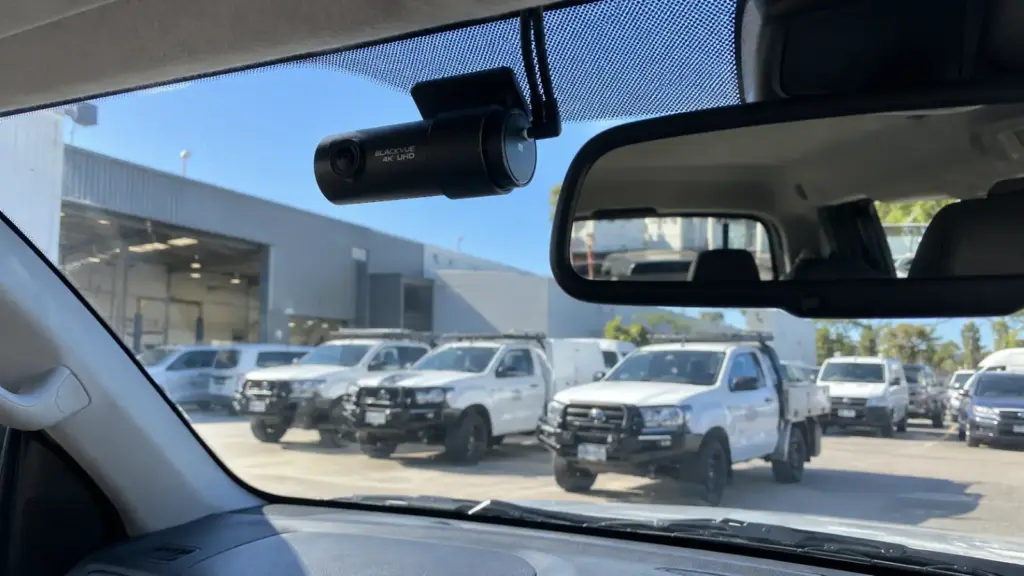
The best fleet dash cams are the ones that suit your vehicles, capture useful footage and work reliably without causing electrical problems or unnecessary downtime. Before installation, businesses should compare camera coverage, recording quality, GPS and cloud features, parking-mode power requirements, and how the system will be maintained across the fleet.
Fitting one camera to a family car is fairly straightforward. Fitting cameras to 15 work utes, six vans and a couple of trucks is a different job. You need a repeatable setup that drivers can use, managers can maintain and technicians can troubleshoot when something goes wrong.
Quick Summary
- Front-facing cameras suit basic road-incident recording, while front and rear systems provide a wider view of what happened around a work vehicle.
- GPS recording is not automatically live fleet tracking. Real-time location monitoring and remote footage access generally need a compatible connected system and an active data connection.
- Parking mode needs a power plan. Hardwiring, suitable low-voltage protection and sometimes a dedicated battery pack help prevent unnecessary starting-battery drain.
- Standardise before you scale. Agree on camera models, memory cards, settings, mounting positions, access rights and a test procedure before fitting the entire fleet.
- Plan installations around vehicle availability. Trial the setup on one or two representative vehicles before arranging a staged rollout.
Which Dash Cam Setup Suits Your Fleet?
For many businesses, a front and rear dash cam is a practical starting point. The right configuration depends on the risks your drivers face, the shape of the vehicle and which events you actually need to record.
| Camera setup | Best suited to | Main advantage | What to check |
|---|---|---|---|
| Front only | Cars, light-duty utes, basic fleet recording | Records the road ahead with less hardware | Does not show an incident behind the vehicle |
| Front + rear | Delivery vans, work utes, general commercial fleets | Records incidents in both directions | Rear mounting, cable routing and door movement |
| Front + cabin | Passenger transport and other justified in-cabin applications | Records activity inside the cabin | Driver and passenger privacy, audio and access rules |
| Multi-camera | Larger trucks, specialist vehicles, complex blind spots | Adds coverage around selected areas | Power demand, camera compatibility and storage capacity |
Camera direction and connectivity are separate choices. Any of these configurations may have local-only or connected features, depending on the product.
A rear camera on a hatchback is not the same installation as one on a ute with a canopy or a van with rear barn doors. The rear camera must have a clear view, and its cable needs to be protected from moving hinges, sharp edges, moisture and the everyday knocks a work vehicle cops.
Also, a reverse camera is not necessarily a substitute for a rear-recording dash cam. Reverse cameras are generally designed to help with manoeuvring. Dash cams are designed to record and retain footage, although certain products can combine functions.
For example, the Gator GHDVR98W Dual Camera records in 1080P at the front and rear. For passenger transport where cabin footage is genuinely required, the BlackVue DR770X-2CH IR pairs a forward-facing camera with an infrared interior camera. The second option involves extra privacy considerations because it records inside the vehicle.
REAL DASH CAM MODELS TO COMPARE
These examples are from Our listed dash cam range. They show how specifications differ. They are not automatically suitable for every fleet vehicle.
| Model | Listed features | What it helps you assess |
|---|---|---|
 Gator GHDVR98W Single Gator GHDVR98W Single |
1080P front, Wi-Fi, GPS and listed 12V/24V compatibility | Whether simple forward recording and recorded journey data are enough |
| Gator GHDVR98W Dual |
1080P front and rear, 1fps parking mode with hardwire kit | Adding rear footage and parking coverage to general work vehicles |
 Eagle I 4.2K Dual Eagle I 4.2K Dual |
4K front, 1080P rear, low-voltage protection and 128GB card included | Greater front-camera detail, storage and parking-mode protection |
 BlackVue DR770X-1CH BlackVue DR770X-1CH |
1080P at 60fps; cloud compatibility via optional LTE module | Whether optional remote access is worthwhile for a front-only camera |
 BlackVue DR970X-2CH Plus BlackVue DR970X-2CH Plus |
4K front, 1080P rear and cloud-enabled capability | Combining higher-resolution footage with connected features |
 BlackVue DR770X-2CH IR BlackVue DR770X-2CH IR |
1080P front and infrared interior recording, built-in GPS | Whether an interior view is justified for passenger-carrying vehicles |
The Gator product photograph above is the same image used for both the single and dual GHDVR98W listings on our source page. Product images are illustrative; confirm the exact kit and included accessories before purchase. A listed feature is not a guarantee of fleet-platform functionality. Confirm vehicle compatibility, any required hardwire or LTE accessories, data costs and software features before ordering multiple units.
For a closer look at the benefits of rear coverage, read are rear dash cams worth it? For more detail on recording technology, see our guide explaining how dash cams work.
What Video Quality Should Businesses Choose?
Choose footage that is clear enough to explain an incident, not simply the camera with the biggest resolution number. A sharp image in good daylight is useful, but work vehicles also travel at night, face glare and drive into low sun.
Look for:
- Clear daytime and low-light recording: Review sample footage in conditions similar to your vehicles’ normal routes.
- Readable incident details: Number plates and road signs may be clearer at some distances than others. No camera can guarantee readable plates in every situation.
- A sensible field of view: Very wide lenses show more of the road, but distant details can appear smaller.
- High-endurance memory cards: These are designed for repeated writing. Confirm the camera’s supported card type and maximum capacity.
- Reliable loop recording: Most units replace older unprotected clips as storage fills. Important events still need to be saved promptly.
- Heat resistance: Vehicles left in the Perth sun get hot. Check the unit’s operating temperature specification and mounting instructions.
For a real comparison, the Gator GHDVR98W Dual records 1080P footage from both cameras, while the Eagle I 4.2K Dual records 4K at the front and 1080P at the rear. The Eagle listing also includes a 128GB high-endurance memory card. Higher resolution can improve detail, but actual plate readability still depends on lighting, distance and movement.
A fleet with long driving shifts needs more recording capacity than vehicles that spend most of the day parked. Storage needs also increase with higher resolution, extra camera channels and higher recording bitrates. Test how many hours of footage the proposed setup actually retains rather than relying on card size alone.
Do Fleet Dash Cams Need GPS?
A fleet dash cam with GPS can add useful speed, time and location information to incident footage. That context can help a manager establish where a recording was made and understand the sequence of events.
As one example, the Gator GHDVR98W Single Camera lists built-in GPS with embedded speed and location data. That can help put a saved clip in context, but it is not the same as a connected fleet tracking service.
However, there is an important difference between GPS recorded on the camera and live fleet tracking:
- Recorded GPS usually stores journey information alongside footage for review later.
- Live fleet tracking sends location updates to an online platform, subject to the camera’s connectivity, software and subscription.
So if you are searching for a fleet tracking dash cam, ask whether it actually supports the tracking functions you need. A GPS logo on the box does not mean a dispatcher can view a vehicle’s current location from the office.
GPS accuracy can also be affected by signal conditions, tunnels and built-up areas. The data is supporting context, not an infallible record of every movement. If site-specific vehicle monitoring is required, it is also worth understanding how an in-vehicle monitoring system (IVMS) works, as these systems can serve a different purpose from a standard dash cam.
Are Cloud-Connected Fleet Dash Cams Worth It?
Cloud-connected cameras are worth considering when managers need remote access to selected recordings, alerts or vehicle information. They are less compelling if the business only needs a reliable record that can be downloaded after an incident.
Depending on the platform and plan, cloud-connected fleet dash cams may offer:
- Remote viewing of live or recorded video.
- Incident alerts sent to authorised staff.
- Remote download or backup of selected footage.
- Camera status information and centralised account management.
- Live GPS tracking, where supported.
For example, Voltaic lists the BlackVue DR770X-1CH as cloud compatible via an optional LTE module, while the BlackVue DR970X-2CH Plus has cloud-enabled remote access capability. Neither listing should be read as a promise that mobile data, live tracking or a fleet management subscription is automatically included.
But cloud access comes with operational questions. Is there mobile coverage where the vehicles work? Does the system require a SIM, hotspot, data plan or subscription? Is footage uploaded continuously, only after an event or only when requested? What happens when a vehicle has no signal?
For mine-site, regional and remote operations, reliable local recording matters even when cloud connectivity drops out. Avoid treating internet access as a replacement for on-device storage.
The best dash cam fleet management setup is the one your staff can run consistently. A system with dozens of features is not much help if no one knows how to find an incident clip.
Should Parking Mode Be Included?
Parking mode can help record incidents while a vehicle is stationary and the ignition is off. It may be useful for utes parked at jobs, vans left in depots and work vehicles stored overnight.
Depending on the model, parking mode may use impact detection, motion detection, time-lapse recording or a combination. It does not mean every camera records every second around the clock.
The Gator GHDVR98W Dual lists a 1fps parking mode when used with a hardwire kit. The Eagle I 4.2K Dual lists low-voltage protection. These are useful examples of why the camera and its power accessories must be assessed together, rather than assuming parking mode works straight out of the box.
The main consideration is power. Cameras need electricity to operate while parked, and a poorly planned setup can drain the vehicle’s starting battery.
Before enabling parking mode, establish:
- Whether the chosen dash cam and hardwire kit support parking mode.
- Whether the vehicle is 12V or 24V and what the product supports.
- Whether suitable low-voltage cut-off or timed shut-off protection is available.
- How long the vehicle may remain parked between engine starts or charging sessions.
- Whether a dedicated dash cam battery pack or another properly designed power solution is justified.
This is especially relevant to vehicles that already run communications, lighting, fridges or other accessories. A dash cam might draw relatively little power on its own, but the combined load matters. Our guide to minimising fleet downtime explains why accessory power planning is worth doing properly.
Why Does Concealed Hardwiring Matter?
Concealed hardwiring keeps a commercial camera installation neat and reduces the risk of dangling cables being pulled, damaged or caught on equipment. It also allows suitable systems to use the ignition and parking-mode power connections they require.
A professional installation should consider:
- Safe power supply: Use the correct circuit, cable protection and compatible hardwire equipment for the vehicle.
- Airbag clearance: Do not route cables across the deployment path of A-pillar or curtain airbags.
- Driver visibility: Place the camera without obstructing the driver’s view or interfering with vehicle sensors.
- Protected rear-camera cabling: Allow for tailgates, van doors, canopies and moving parts.
- Existing electrical systems: Account for aftermarket radios, trackers, beacons, inverters and any pre-existing wiring modifications.
- Maintenance and removal: Leave a serviceable installation that can be inspected, repaired or removed without avoidable damage.
Product voltage support also needs checking. Voltaic explicitly lists the Gator GHDVR98W Single Camera as compatible with 12V and 24V systems, but that does not establish compatibility for every other model in the range.
Plugging a camera into a 12V socket may be enough for occasional private use. Across a working fleet, a properly designed and tested installation is usually easier to standardise and less vulnerable to accidental disconnection.
How Are Fleet Installs Different?
Installing one dash cam is mainly a vehicle and product decision. Installing fleet dash cams is also a business process. Every camera must work as expected, every vehicle needs a suitable installation and the system must remain manageable after the initial rollout.
Consider a plumbing business running 12 utes. If each driver chooses a different camera, the business could end up with several apps, different recording settings, different memory cards and no agreed method for retrieving footage. If one camera stops recording, the problem might go unnoticed until the footage is needed.
For example, a business could trial one front-and-rear model on its standard utes and keep a separate, documented setup for passenger vehicles that genuinely need interior recording. Choosing models from the same brand does not necessarily mean they use identical apps, accessories or account settings.
A standard fleet specification avoids much of that confusion. It should cover the approved camera model or models, installation position, memory card, firmware, recording settings, power protection, driver instructions and maintenance checks.
Not every vehicle has to use identical hardware. A dual-cab ute and a light truck may need different cable lengths or camera locations. The goal is consistent performance and procedures, not forcing unsuitable hardware onto every vehicle.
How Can Businesses Standardise Dash Cams?
Start with a small pilot, record the chosen settings and approve a repeatable installation specification before buying hardware for the whole fleet.
Use this checklist when comparing products or briefing an installer. You can tick each item as it is confirmed.
Fleet Dash Cam Installation Checklist
Confirm these decisions before ordering equipment or scheduling vehicles.
01. Vehicle & Coverage
02. Recording & Data
03. Power & Rollout
For a mixed fleet, complete this checklist for each vehicle group rather than assuming one wiring plan will suit all models.
For a broader approach to keeping equipment consistent, see how to manage a fleet of vehicles. Give the specification a version number and maintain a record of the equipment installed in each vehicle. Include the unit serial number, memory card, firmware version, date fitted and who has access to the footage. These details make later maintenance and replacement much easier.
How Can Installation Downtime Be Reduced?
A staged rollout helps keep vehicles earning their keep while dash cams are installed. The right schedule depends on vehicle numbers, complexity, other electrical accessories and whether suitable work can be done on-site.
A Practical Four-Step Fleet Rollout
- 01Audit: List each vehicle, existing electrical equipment, required camera views and working hours.
- 02Pilot: Install and test one or two representative vehicles, including parking power and footage retrieval.
- 03Roll out: Book batches around maintenance visits, shift changes or planned vehicle availability.
- 04Hand over: Test recordings, document settings and show authorised staff how to access clips.
Some installations may be suitable for on-site auto electrical field services, while others are better completed in a workshop. The right arrangement depends on the vehicle, equipment and job scope. For businesses planning wider upgrades, coordinating cameras with other electrical work can avoid pulling the same trim apart twice.
What About Driver Privacy and Recording Laws?
Before installing fleet cameras, businesses should set clear rules on what is recorded, who can access footage and why recordings are being collected. This matters particularly for driver-facing cameras, audio recording, GPS tracking and systems that allow remote viewing.
The Fair Work Ombudsman’s workplace privacy guide recommends explaining monitoring practices and having a clear workplace privacy policy. The Office of the Australian Information Commissioner also explains that workplace surveillance may be covered by different Commonwealth, state and territory rules.
For Western Australian businesses, review the Surveillance Devices Act 1998 (WA), particularly before enabling audio or in-cabin monitoring. Businesses operating interstate need to consider the rules where their vehicles and staff operate. The applicable obligations depend on the situation, not just the device being installed.
A practical policy should identify:
- Whether cameras record the road, the cabin, audio or GPS information.
- When recording happens, including during breaks and outside working hours.
- Who can view, download and share footage.
- How long recordings are retained and when they are deleted.
- How incident footage is secured and who manages requests for access.
- Whether a third-party cloud provider stores information and where that storage is located.
Do not assume that a camera being legal to own automatically makes every use of its audio, location or monitoring functions appropriate. Where the Privacy Act applies, the Australian Privacy Principles may also affect handling of identifiable footage and location data. See the OAIC’s guidance on securing personal information. Seek advice on the specific proposed monitoring arrangement where necessary.
What Does Fleet Dash Cam Installation Cost?
Fleet dash cam installation costs depend on more than the price of the camera. For budgeting, separate the upfront hardware and fitting costs from any ongoing software and data expenses.
Allow for:
- Cameras and accessories: Front-only, dual-channel, cabin-facing or multi-camera systems have different hardware requirements.
- Vehicle-specific installation: Large vans, trucks, canopies and moving rear doors may need longer cable runs or more fitting work.
- Parking-mode equipment: Hardwire kits, voltage protection and optional dedicated power solutions can affect the total.
- Storage and connectivity: High-endurance memory cards, mobile data, cloud licences and software subscriptions may be recurring costs.
- Administration and maintenance: Training, footage retrieval, replacement cards and periodic operating checks should be part of the plan.
- Fleet scheduling: Coordinated batch work can reduce disruptions, although identical installation times should not be assumed for mixed vehicles.
Our guide to professional dash cam installation costs explains the general price factors for individual vehicles. For model examples and currently advertised starting prices, see the dash camera range listed on our installation page. Those listings are a guide to individual products, not a fixed fleet installation quote.
When comparing fleet quotes, ask for the proposed camera model, number of channels, power setup, cable routing, testing scope, warranty details and all recurring charges. The lowest upfront price is not always the cheapest system to operate across five years.
What Should Be Tested Before Handover?
Every installed system should be tested on the vehicle, not simply powered on and assumed to work. Fleet managers should receive a consistent handover record covering the following:
- Confirm front, rear and any other camera views are correctly positioned.
- Check daytime and, where practical, low-light sample footage.
- Verify that recording starts and stops as intended.
- Test GPS data, timestamps and any required cloud connection.
- Check parking mode and the configured battery protection.
- Confirm footage can be downloaded and played on the equipment the business will use.
- Confirm that protected events and normal loop recording behave as expected.
- Document model, settings, memory card and any access credentials under the company’s security procedures.
The same basic checks should become part of the fleet’s routine maintenance program. A camera with a failed memory card is just a windscreen ornament when an incident happens.
FAQs
What Is the Best Dash Cam for Fleet Vehicles?
The best dash cam for fleet vehicles is a reliable, vehicle-compatible system with the camera coverage, footage quality, power protection and data access your business actually needs. For many mixed fleets, a proven front and rear camera with concealed hardwiring is a sensible starting point. Businesses requiring live alerts or location monitoring should compare compatible cloud platforms as well.
Can a Fleet Dash Cam Track Vehicles?
Some fleet dash cams record GPS information for later review, while connected models may provide live vehicle tracking. Check whether real-time location updates, account management and connectivity are included, optional or subscription-based.
Do Fleet Dash Cams Record When Parked?
Certain models can record while the vehicle is parked using impact, motion or time-lapse modes. They need a compatible power supply and suitable battery protection. How long parking mode operates depends on the camera, settings, power source and vehicle usage.
Can One Dash Cam Model Fit Every Vehicle?
Not always. A common model and software platform can make fleet management easier, but camera mounts, cable lengths, 12V or 24V electrical systems, rear doors and other equipment may require different installation arrangements. Trial the system on representative vehicles first.
Can Fleet Dash Cam Footage Support Insurance Claims?
Footage may help establish the sequence of events in an accident and provide supporting evidence for an insurer. It does not guarantee that a claim will be accepted or determine fault on its own. Save the original relevant recording promptly, because normal loop recording may otherwise overwrite it.
Planning Fleet Dash Cam Installation in Perth?
A good fleet camera system should be reliable on the road, straightforward to manage and installed without compromising the vehicle’s electrical systems. Getting those details right before the first camera goes in saves a lot of headaches later.
At Voltaic Auto Electrical, our team brings more than 20 years of hands-on auto electrical experience to dash cam installation in Perth and integrated fleet vehicle fit-outs. We work with front and rear camera systems, concealed hardwiring, compatible parking-mode setups and vehicle-specific electrical requirements, with workshop locations in Welshpool and Wangara and field-service options for suitable jobs.
Have a fleet to equip? Talk to the Voltaic team about your vehicles, preferred camera features and installation schedule. We’ll help scope a practical setup without the wiring spaghetti.