

How does a caravan connect to Starlink?
The dish uses an electronically steered antenna to track passing Starlink satellites without relying on a traditional fixed satellite connection. Those satellites pass data through the Starlink network, and the dish feeds the connection to your caravan’s router.
Your devices connect to the router by Wi-Fi, much like they would at home. The main difference is where the internet connection comes from. Instead of using a fixed NBN line or a nearby mobile tower, your caravan connects through satellites overhead.
From the sky to your screen
The connection moves through four main stages.
Dish
The caravan-mounted dish communicates with satellites overhead.
Satellite network
Starlink’s low-orbit network carries data to and from the wider internet.
Router
The router turns the satellite connection into Wi-Fi inside the caravan.
Your devices
Phones, laptops and streaming devices connect to the caravan Wi-Fi.
What do you need to use Starlink in a caravan?
You need more than the dish itself. A practical caravan setup brings the equipment, plan, mounting position and electrical system together.
- A Starlink kit: This includes the antenna and the equipment needed to create your internet connection.
- A suitable service plan: Starlink Roam is designed for motorhomes, caravanners, campers and people working while travelling. Check the current Starlink plan terms before leaving, especially if you want in-motion or overseas use.
- A clear view of the sky: The dish needs open sky across its field of view, not a narrow gap between trees.
- A secure mount or portable stand: A roof mount suits travellers who want a permanent setup. A portable dish lets you move it away from trees when parked.
- A reliable power supply: Your caravan must provide enough power for the dish, router and any inverter or power converter used by the installation.
- Protected cable routing: Exterior cables need protection from movement, weather and rubbing. Any cable entry through the caravan must stay sealed.
Does Starlink work while a caravan is moving?
Starlink can work while a caravan is moving in Australia when you use compatible equipment and a plan that supports in-motion use. Starlink lists Australia as an approved in-motion market, but plan rules and supported hardware can change.
The dish matters. Starlink advises against using actuated models, which contain motors, while moving because they were not designed for that job. A securely installed flat, non-actuated antenna is the safer option for a moving caravan.
A Roam plan may support in-motion use, but a Residential plan does not. Check your exact plan in your Starlink account before relying on it during a trip.
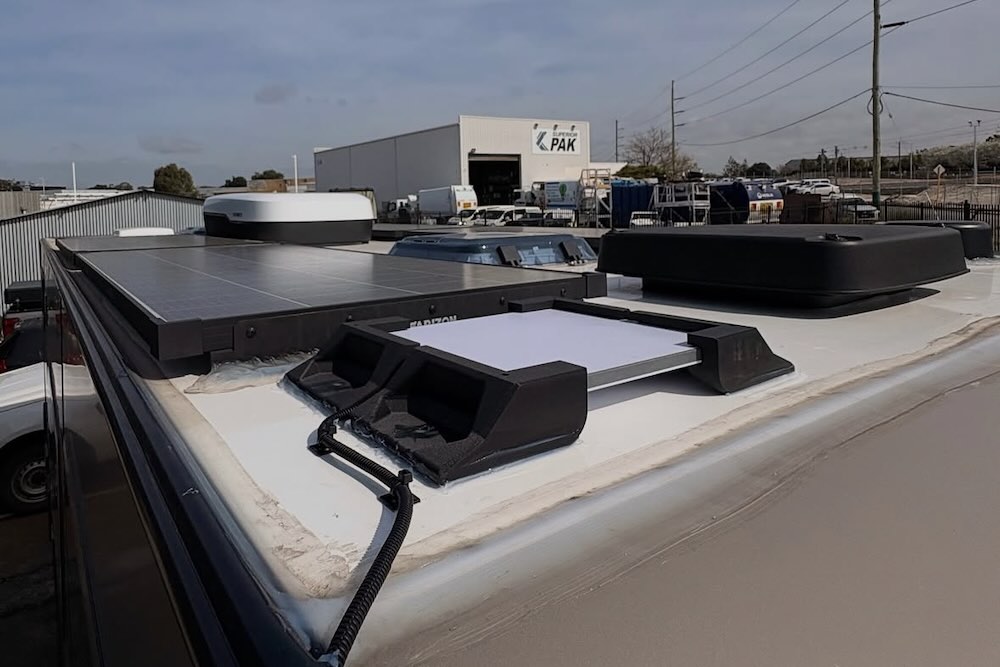
The antenna needs a secure mounting position with as much open sky around it as the caravan roof allows.
How much power does Starlink use in a caravan?
Power use depends on the Starlink model. Starlink’s published specifications list average consumption of 25 to 40 watts for Starlink Mini and 75 to 100 watts for the current Standard kit.
25 to 40 W
Starlink Mini
Lower average power use makes the Mini easier to support from a caravan battery system.
75 to 100 W
Starlink Standard
Higher average power use means battery capacity and charging input need closer attention.
Running Starlink Mini continuously for 24 hours uses roughly 0.6 to 1.0 kilowatt-hours before allowing for conversion losses. The Standard kit uses roughly 1.8 to 2.4 kilowatt-hours over the same period. Most travellers reduce that load by switching Starlink off overnight or when nobody needs the connection.
Do not size a caravan battery from the Starlink figure alone. Fridges, lights, pumps, fans, laptops and other appliances all draw from the same system. Solar conditions also change from day to day, so your setup needs enough reserve for poor weather and shaded campsites.
Can you run caravan Starlink from 12 volts?
Starlink Mini accepts a 12 to 48-volt DC input, but the cable, voltage at the dish and power source must meet its requirements. Starlink specifies a 100-watt USB Power Delivery source at 20 volts and 5 amps when its USB-C accessory cable is used.
The Standard and Flat High Performance arrangements commonly use a 240-volt supply, so a caravan installation may need an inverter connected to a suitable secondary battery. Voltaic recommends a secondary battery for these setups so Starlink does not drain the vehicle’s starter battery.
Cable length and cable size matter with low-voltage equipment. A poor connection or undersized cable can cause enough voltage drop to make the system restart or cut out, even when the battery appears charged.
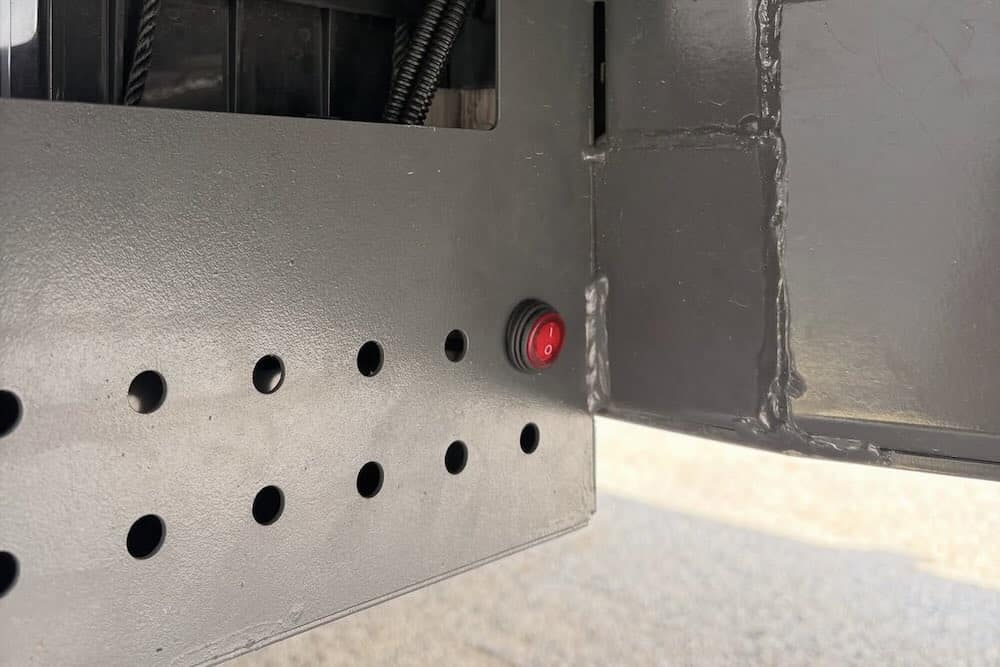
A dedicated switch makes it easy to shut the system down and prevent unwanted battery drain.
Does Starlink need a clear view of the sky?
Yes. Starlink needs a wide, clear view of the sky to maintain a stable connection as satellites move overhead. A dish may still connect near a tree or building, but repeated obstructions can cause short dropouts.
Those brief interruptions may go unnoticed while checking email. They become much more obvious during a video meeting, internet phone call, online game or live stream.
Before settling into a campsite, use the obstruction tool in the Starlink app to scan the proposed position. Roof-mounted air conditioners, solar panels, vents and storage boxes should not block the dish’s view. If you often camp under heavy tree cover, a portable setup can give you more freedom to place the dish in an open area away from the van.
Fixed or portable Starlink: which is better for a caravan?
A fixed roof installation suits frequent travellers who want less setup at each stop. A portable setup suits caravanners who often park under trees and need to move the dish into a clear patch of sky.
| Consideration | Fixed roof installation | Portable setup |
|---|---|---|
| Setup at camp | Switch it on and connect. | Unload, position and connect the dish. |
| Dish position | Limited to where the caravan is parked. | Can be moved to find clearer sky. |
| Cables | Protected and routed through a sealed entry point. | Loose cable must run between the dish and caravan. |
| Security | Dish remains attached to the caravan. | Equipment sits outside and needs to be packed away. |
| Use while moving | Possible with suitable hardware and an eligible plan. | Not suitable while the caravan is moving. |
What can affect Starlink performance on the road?
Starlink performance changes with the location, network demand, plan, weather and number of obstructions around the dish. Movement can also cause brief changes in speed or latency.
Heavy rain may reduce performance for a short period. Dust and grime on the dish can also become a problem after long stretches on unsealed roads. Check the mount, cable protection and dish surface as part of your regular caravan inspection.
Your internal Wi-Fi setup matters too. A router hidden inside a metal compartment may struggle to cover the whole caravan or reach an outdoor chair. Place it where the signal can reach the areas in which you use your devices.
How is Starlink installed in a caravan?
A professional installation starts with the way you travel. The installer checks your caravan roof, available mounting positions, existing battery system, charging capacity and where you want Wi-Fi coverage.
A sound caravan installation should cover
- A secure antenna position with open sky around it
- Clearance from roof hatches, air conditioners and solar panels
- Protected exterior cabling with no loose sections
- Minimal, sealed cable-entry points
- A power supply matched to the Starlink model
- A switch or isolation method to stop unwanted battery draw
- Router placement that provides useful Wi-Fi coverage
- Testing of the connection, power system and final cable routing
A simple installation can take anywhere from about an hour to a full day, depending on the caravan and equipment. Voltaic advises that most vehicle installations take up to a day. A job that also needs a secondary battery system will often take around two days.
Is Starlink worth it for a caravan?
Starlink can be worth it if you spend time outside reliable mobile coverage, work from the road or want a stronger connection at remote campsites. It can support video calls, streaming, trip planning and everyday browsing when you have power, active service and clear sky.
It may be harder to justify if you take a few short trips each year and stay in towns with strong mobile coverage. The equipment, installation, battery capacity and monthly plan all add to the cost. Starlink Roam plans can be paused through Standby Mode, which may suit seasonal travellers, though Standby Mode itself is not intended for in-motion use.
Frequently asked questions
Will Starlink work anywhere in Australia?
Starlink covers much of Australia, including many places beyond normal mobile coverage. It still needs clear sky, a suitable plan and enough power. Check Starlink’s current availability map and plan terms before travelling to a remote area.
Can I use a Residential Starlink plan in my caravan?
Residential plans are intended for a fixed land-based address and do not support in-motion use. Starlink Roam is the plan category designed for motorhomes, caravanners, campers and people working on the go.
Does caravan Starlink need a dual battery?
A dual battery is not compulsory for every kit, but it protects the vehicle’s starter battery and gives the system a more suitable power source. Battery capacity, charging input, Starlink model and daily run time determine the right setup.
Can I leave Starlink on all night?
You can leave it on if your electrical system has enough capacity, but it will keep drawing power. Switching it off when you are asleep can save a large part of the daily load, especially with a Standard kit.
Will Starlink work under trees?
It may connect under light tree cover, but branches and foliage can interrupt the signal. A portable dish gives you the option to move it into open sky when the caravan itself is parked in shade.
Can several people use caravan Starlink at once?
Yes. Several phones, laptops and entertainment devices can share the caravan Wi-Fi. The connection may slow when several people stream, download large files or join video calls at the same time.
Get your caravan ready for Starlink
Starlink gives a caravan its own internet connection through a roof-mounted or portable satellite dish. A good setup comes down to four things: the right equipment, clear sky, enough battery capacity and neat installation.
Voltaic provides Starlink vehicle fit-outs in Perth for caravans, trailers, cars and trucks. The team can secure the antenna, protect the cabling, build a suitable power supply and test the complete system before your next trip. If your existing power system needs more capacity, Voltaic can also design a dual battery installation around your touring setup.
Most installations are completed within a day, while systems that need a secondary battery will usually take longer. Contact Voltaic for a quote based on your caravan, Starlink model and travel plans.